How to Protect your Emails

How to Protect your Emails
Advanced Email Protection Guide for Levifi Partners
Difficulty: Easy
Time: Less than 1 minute
Applies to: Levifi IT Partners
All Levifi partners have access to Advanced Email Protection for spam filtering and email security.
This guide explains how to block and report unwanted emails that may appear in your inbox.
Step 1
Start by opening Microsoft Outlook on your computer and locating the suspicious email. Be sure not to click on any links or images within the message, as they may contain harmful content.
Step 2
With the email selected, click on the Barracuda Email Protection add-in located in the top ribbon of Outlook. A sidebar will appear with an option to report the email. Click that option to continue.

Step 3
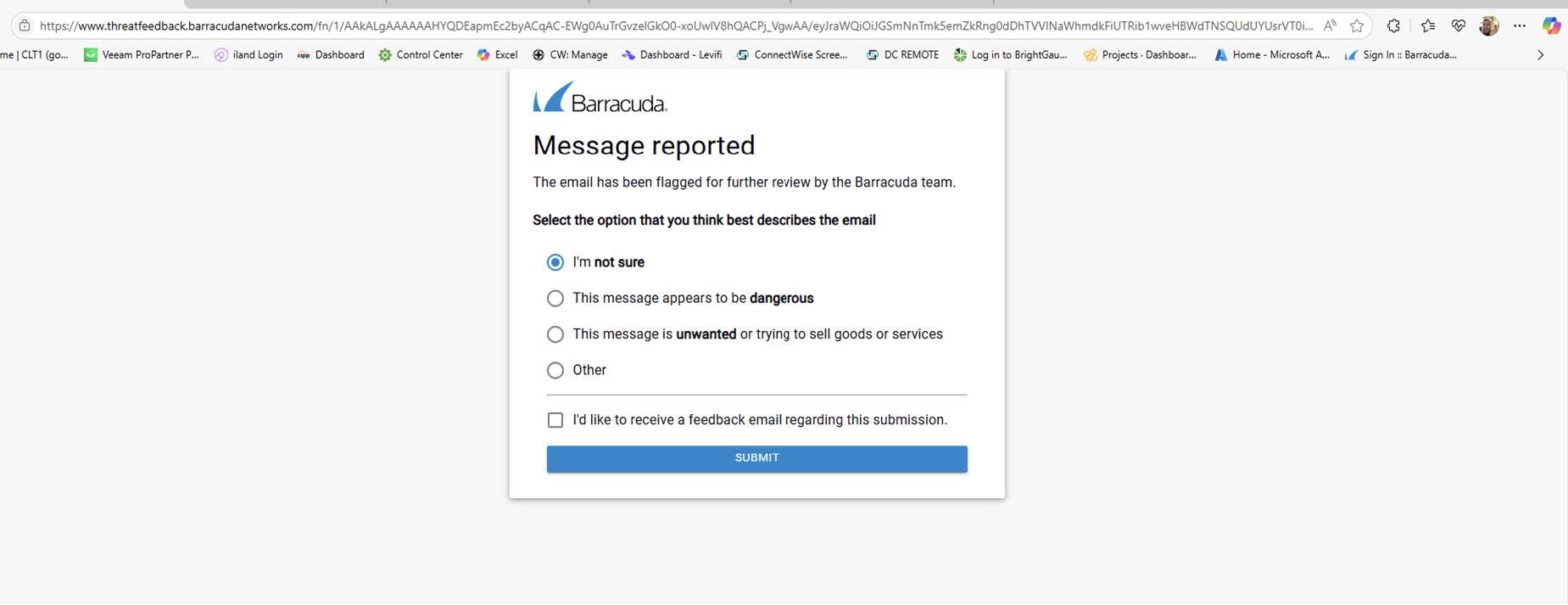
After clicking “Report,” a new page or tab will open in your web browser.
Select the reason for blocking the message and submit the form. The email will be blocked, similar future messages will be filtered automatically, and the email will be removed from your Outlook
inbox.
For further assistance, contact support@levifi.com